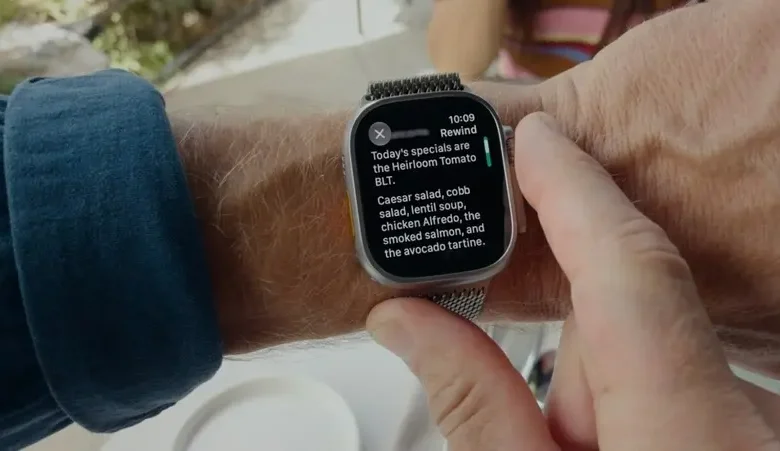
Apple’s new feature allows Apple Watch users to record conversations and turn them into summaries of key information, helping them remember appointments, costs, and daily tasks. But it also raises privacy questions and revives concerns that devices could become tools that constantly listen to what is happening around their owners.
Apple launched a new set of Audio Intelligence features on Tuesday in the first developer betas of iOS 27.3 and watchOS 27.3. The update includes four AI-powered features that enable Apple Watch Series 12 users to detect important sounds, identify songs, review conversations, and automatically take notes.
After just one day of testing Siri Recaps on an Apple Watch, its practical value is clear enough that its benefits may outweigh concerns about recording and summarizing conversations using AI.
However, the experience also reveals areas that need improvement, particularly regarding the recording of unimportant details or the retention of information users do not need to remember, according to a TechCrunch report reviewed by Al Arabiya Business.
The sound and song recognition features do not raise the same privacy concerns. The first is designed to identify important sounds, such as alarms and doorbells, while the second uses Shazam technology to recognize songs—a function iPhone users have relied on for years.
Greater attention, however, is focused on Live Rewind and Siri Recaps, which record conversations taking place with or near the watch wearer and convert them into text or summaries.
Live Rewind allows users to replay the last 15 seconds of a conversation to hear what was said, while Siri Recaps summarizes audio content throughout the day and saves notes containing key information and details users may need to refer to later.
How Apple Addresses Privacy Concerns
Apple says it has taken steps to protect user privacy when these features are enabled. Wherever possible, recordings are processed and AI models run on the device itself. The company also says it does not identify speakers or retain the original audio recordings.
The systems are also designed to block sensitive information, such as government ID numbers and personal account details, to reduce the risk of exposing private data.
Despite these safeguards, not everyone is comfortable with the idea of devices continuously listening to conversations around users, even if the purpose is to provide more useful services.
The concerns are understandable, particularly as technology already permeates many aspects of daily life. At the same time, practical use shows the real value AI-powered note-taking tools can offer.
Siri Recaps in Practice
There was not yet an opportunity to test Live Rewind in a suitable situation, and it may not be the most frequently used feature. If someone misses part of a conversation, it is usually simpler to ask them to repeat what they said rather than replay the last 15 seconds on the watch.
Siri Recaps, however, showed from the outset that it could become a useful daily tool for saving important information and referring back to it later.
Its value became apparent when a family member took a car in for repairs and received a replacement vehicle. At both locations, staff provided a large amount of information verbally about repair schedules, costs, and policies, at a pace that made manual note-taking difficult.
When reviewing the Siri summaries later in the day, several important details had been retained. These included the customer’s insurance deductible, the expected repair time, the amount of fuel in the replacement car at pickup, and other information that could be necessary when reviewing the agreement.
However, the feature did not separate this information from later conversations at home. It added other details, such as an errand that needed to be completed and childcare arrangements during the week, which the family had been discussing while setting an appointment in the shared calendar and choosing an appropriate alert time.
Ideally, Siri Recaps would have saved these details in a separate note titled “Family Schedule and Tasks,” rather than merging them with the car-repair information under a subheading in the same note.
Constant Recording May Become Nuisance
Because Siri Recaps was set to run continuously, it also recorded details of limited importance, such as a plan to watch midterm election coverage on television.
While the information may have been accurate, it is not the kind of detail users typically need to note or retain in their daily records.
These details also served as a reminder that the watch was listening to everyday conversations—something that could feel intrusive in other situations, especially when discussions involve personal or sensitive topics.
That prompted consideration of disabling the summaries feature during evening hours at home, so family conversations over dinner would not be recorded and automatically saved by the watch.
On the other hand, it was useful that the feature captured a reminder about an errand that needed to be completed. Other details, such as what family members were watching on television, would only have value if the user wanted to export the summary to Apple’s Journal app to preserve personal daily memories.
Improvements Needed
The experience highlights several improvements that could make Siri Recaps more effective. The most important is separating nonessential details from important notes, saving them in standalone notes or separate sections that can be exported or deleted without affecting the rest of the content.
Allowing users to delete any point in a summary directly by swiping left would also be easier than entering edit mode, selecting text, moving it, and manually deleting unwanted information.
Another useful improvement would be an option to automatically export saved Siri summaries to the Notes app, rather than requiring users to complete the step separately each time.

A dedicated folder in Notes could store these summaries, making them easier to access and use as a central place for collecting reminders and daily tasks.
It is understandable that Apple may not enable this option by default, given that people use the Notes app in different ways. But offering it as an optional setting would benefit users who prefer to keep all their notes and task lists in one place.
Although the idea of a watch continuously listening to conversations may feel uncomfortable at first, the experience suggests that automatic note-taking can offer tangible value in daily life, especially for information that is difficult to remember or write down during fast-moving conversations.
Related Topics:
Apple sets March 21 event, Wall Street sees new, smaller iPhone
Gigi Hadid Celebrates New Campaign with Havaianas
Georgina Rodriguez Promotes Saudi Perfume Label Laverne
Pasquale Bruni Chooses Georgina Rodriguez as Gulf Campaign’s Face